


Surf Captain
4.434.00 Reviews
App Specs
- Version
- 1.4.8
- Updated On
- License
- Free
- Downloads
- 10,000+
- Developer
- Weather Captain
- Categories
- Weather
- Platform
- Android
Screenshots
 Analysis by AppCompare
I like a surf forecast best when it helps me make a decision, not when it gives me a screen full of numbers to admire. That is the promise I see in Surf Captain: a weather app built around the practical question of whether a beach is worth the trip today. Its focus makes it more useful to surfers than a general forecast, though it still works best as a planning aid rather than a guarantee that the waves will be perfect.
Surf Captain is made by Weather Captain and is free to install, with in-app purchases available. It has an average rating of 4.5 from 58 ratings, and more than 10,000 installs. The app is rated for everyone, runs on Android 7.0 or later, and its current version is 1.3.2. Those details make it easy to try without committing to a paid download, although anyone considering an in-app purchase should check what the purchase offers before spending.
Planning a Surf Session with Surf Captain
Before I compare forecast details or decide whether a beach is worth the drive, I’d start with the practical question this section explores: how Surf Captain can fit into planning a session around real-world time constraints. I find it useful to think in terms of a shortlist and a realistic arrival time, so a promising forecast becomes a workable plan rather than just an appealing set of conditions.
A focused first look
When you first open Surf Captain, you’re greeted with a sleek and intuitive interface. It’s designed to get you straight to the info you need without any unnecessary distractions. I appreciate how everything is laid out; it’s like the app developers knew I’d be checking it while running late to catch those early morning waves. The navigation is smooth, and even if you’re not tech-savvy, you’ll find it easy to find your way around.
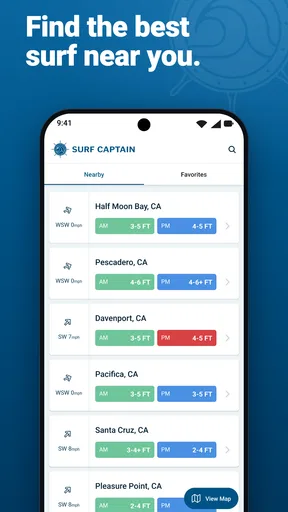
The home screen offers a quick view of conditions at your favorite spots. Setting these spots up is a breeze, and once you’ve done that, you can easily swipe through to see what’s happening at various beaches. It’s all very user-friendly, which is perfect when you’re juggling a board, a wetsuit, and a cup of coffee.
That saved-spot workflow is especially handy if you tend to choose between a few familiar beaches rather than travel to a new break every time. I’d set up the places I actually visit, then compare them before leaving home instead of trying to remember conditions from one screen to another. It also makes the app easier to use in a hurry: check the shortlist, look for the most promising combination, and decide whether the drive makes sense.
Forecast details that support a decision
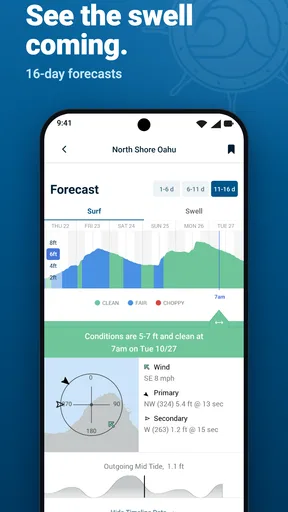
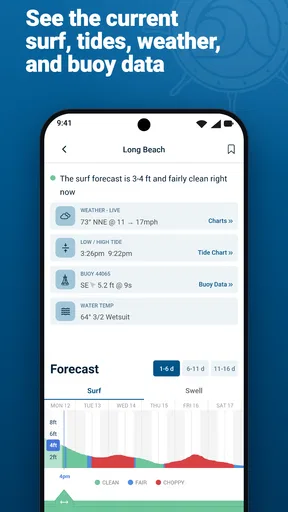
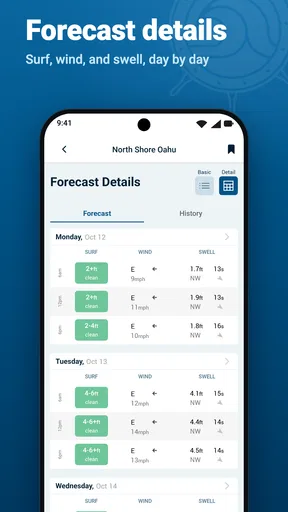
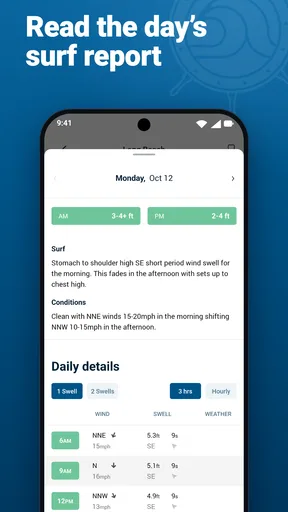
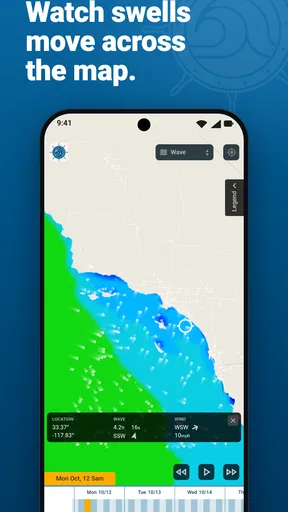
Now, let’s talk features. What makes Surf Captain really shine is its detailed surf forecasts. You get everything from wave height and period to wind speed and direction. It even includes tide times and water temperatures, which, if you’re like me and prefer not to freeze, is super helpful.
Worth Reading Before You Choose

EA SPORTS FC Mobile 26 Is a Bigger Football Game, but It Takes Time

Flipboard Shows What News Apps Must Do Beyond the Feed

Switching to Android Auto Means Rethinking Your Driving Routine

Google Calendar Makes a Crowded Week Easier to Manage

Ludo King Makes the Most of the Minutes Between Plans

Baby Panda World Brings Quick Play to Modern Phones, but Its Game Library Feels Busy
Those details are more useful together than in isolation. A wave-height figure may catch my eye, but I would not choose a beach on that alone: wind direction, tide timing, and the shape of the session I want all matter. My practical tip is to compare the forecast across your saved spots, then check the tide time against when you can realistically get there. A promising window that has already passed is not much help, and a less impressive-looking forecast may still suit a quick practice session.
Water temperature has a similarly down-to-earth role. It helps me think about what to wear and whether I’m prepared to stay in for long, rather than treating the forecast as a simple yes-or-no signal. For someone learning to read surf conditions, seeing wind, swell, tide, and temperature in the same planning routine can also encourage better questions than “Are there waves?” The app’s figures are useful context, but they still need to be interpreted for the beach and the surfer.
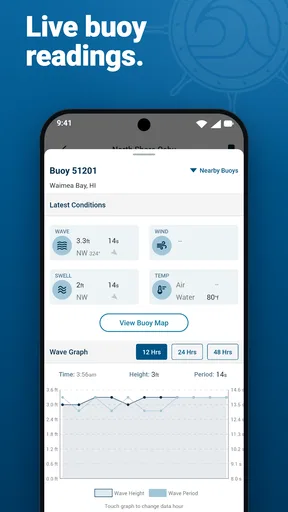
One of my favorite features is the real-time surf reports. These are updated regularly, so you’re always in the know. There’s also a community aspect where users can share their own reports, adding a personal touch to the data-driven insights. It’s like having a local’s knowledge right in your pocket.
Community reports are most valuable when I treat them as a second perspective, not a substitute for checking the forecast. A report can help add a current, human view of a spot, but conditions change and one surfer’s idea of “good” may not match another’s. I’d use those reports to refine a plan or decide whether a beach deserves a closer look, while keeping my own ability and comfort in mind.
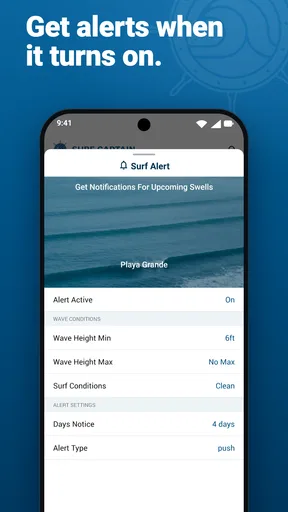
And I can’t forget the alerts! You can set up notifications for when conditions are just right. No more missing out on perfect waves because you were stuck in a meeting or, worse, sleeping in.
Alerts make the most sense when I use them to flag an opportunity rather than hand over the whole decision. If I have a busy day, a notification can remind me to check a forecast at a useful moment; it cannot account for a last-minute change in my schedule or replace a fresh look before I travel. I’d keep the alert criteria focused on conditions that would genuinely make me consider going, so that notifications stay helpful instead of becoming background noise.
How I’d use it on an ordinary day
Imagine I have a free morning, but only enough time to visit one beach. The night before, I can compare my saved spots and note which forecast seems to line up with my available hours. In the morning, I can revisit the conditions, check the tide timing, and see whether a recent community report adds anything useful. If the forecast looks marginal or the timing is wrong, I can avoid a wasted drive; if it looks promising, I can pack for the water temperature and head out with a clearer expectation.
That is a realistic strength of a dedicated surf tool: it helps connect forecast information to a concrete choice. It is particularly useful for surfers who already know their local beaches and want a consistent way to compare them. A newer surfer may also find the combination of measures helpful, but should not assume the app can decide whether a particular break is safe or suitable. I would still rely on local knowledge, personal judgement, and conditions observed on arrival.
For a surf trip, I’d use the same approach differently. Instead of treating one forecast as a promise for the whole day, I’d check more than one potential spot and keep a flexible plan. That reduces the temptation to drive somewhere simply because one number looks attractive. Forecasts are a snapshot of expected conditions, while the coast is changeable; having alternatives is more useful than expecting a single screen to settle every question.
Forecast confidence and everyday friction
I’ve found the app’s forecasts to be pretty spot-on. Of course, no weather prediction is 100% accurate, but Surf Captain does a commendable job at getting close. The app pulls data from reliable sources, which is likely why it’s so trustworthy.
I would still avoid reading “pretty spot-on” as a promise. Surf conditions can vary by location and timing, and a forecast that looks good at a broad level may not match what I see at a specific beach. The sensible workflow is to use the forecast to plan, then reassess when I arrive. That matters most when I’m travelling a long way, have limited time, or am deciding whether conditions are appropriate for my experience.
Performance-wise, it’s a smooth experience. I haven’t encountered any crashes or slow load times, which is crucial when you’re trying to make a quick decision about whether to hit the water or not.
The main trade-off is that a specialised forecast can only help if I know how to turn its details into a decision. Someone who wants a simple umbrella-style weather answer may find wave period, wind direction, and tide information more involved than necessary. Conversely, surfers who want to study local conditions closely may still want to check more than one source, especially when a session depends on a narrow window. I see Surf Captain as a convenient planning companion, not the final authority on the ocean.
Where it fits among weather alternatives
Compared with a general weather app, Surf Captain has a clearer job: it brings surf-relevant details such as wave height, period, tides, and water temperature into the same routine as wind. A standard weather forecast is often quicker for checking rain or the day’s general outlook, and I would keep using one when those are the questions I need answered. For choosing between surf spots, though, the more focused information is a better fit.
It also occupies a different role from asking a local surfer or checking conditions in person. Those sources can add context that a forecast cannot capture, while the app is convenient for comparing options before setting off. I would combine them rather than treat them as rivals: use the forecast to narrow down the plan, then use current observations and local judgement to decide whether to paddle out.
There is a useful distinction here for beginners. Surf Captain can make it easier to notice the factors that influence a session, but it is not a replacement for learning how to read the sea or understanding a particular break. Experienced surfers may be able to interpret the figures quickly; a beginner may need time to learn what matters at their regular beach. In either case, the benefit comes from using the information thoughtfully, not from assuming the app removes uncertainty.
What could be better
While I’m a big fan of this app, there’s always room for improvement. I would love to see more integration with wearable tech, like smartwatches. Imagine getting a wrist buzz when the surf’s up! Also, some additional features like surf community events or meetups could enhance the social aspect of the app.
Another idea could be the inclusion of skill-based tips or tutorials, especially for beginners. Having that extra bit of guidance could make the app appeal to a broader range of users.
Those gaps also help define who should look elsewhere. If I mainly want a broad daily forecast, I would stick with a general weather app for that task rather than open a surf-specific tool. If I need instruction, safety guidance, or a way to organise meetups, I would choose a resource built for that need instead of expecting a forecast app to do it all. And if I prefer not to interpret several conditions, the detailed surf focus may feel like extra work rather than a benefit.
The free download makes it straightforward to test whether the forecasting approach suits my routine. In-app purchases range from $9.99 to $39.99 per item, so I’d first use the free experience and decide whether I genuinely need anything beyond it. That is a practical way to avoid paying for an upgrade simply because it is available. The app’s value depends less on the number of figures on screen than on whether those details help me pick a beach and a time more confidently.
Who will get the most from it
I’d recommend Surf Captain most readily to surfers with a handful of regular spots, a changing schedule, and an interest in comparing conditions before they travel. It suits the person who might squeeze in a session before work, check the forecast during a lunch break, or choose a beach for the weekend. The saved-location view and alerts are a natural match for that kind of routine, while the forecast details give more context than a simple general-weather check.
It may also appeal to someone who is still learning how different conditions fit together, provided they treat the app as a prompt to learn rather than a coach. Comparing wind and tide across familiar locations can help build a personal sense of what tends to work. I would start with the beaches I know and observe how the forecast compares with what I actually experience; that is more useful than making a confident call from unfamiliar conditions alone.
On the other hand, I would skip it if I never surf, if my weather checks are limited to rain and temperature, or if I expect a forecast to guarantee ideal waves. It is also not my first choice for users who want a community calendar, wearable notifications, or beginner lessons as the main purpose of an app. A specialised tool is only worthwhile when its specialisation matches the decision I need to make.
A measured verdict for surfers
Overall, Surf Captain is a fantastic app for anyone who loves surfing. It’s packed with features that provide everything you need to plan your surf sessions efficiently. The community aspect is a nice touch, making it more than just a data source but also a way to connect with fellow surfers.
If you’re serious about surfing or just starting out, this app is definitely worth checking out. It’s like having a personal surf guide available at your fingertips 24/7. So go ahead, download it, and never miss another perfect wave!
My more measured recommendation is to try it if surf conditions are a regular part of how you choose where to go. I like that it brings spot comparisons, surf forecasts, user reports, and alerts into a focused routine, and I’d use it to make better-informed plans rather than to chase certainty. Its limitations are real: forecasts can be wrong, interpretation takes some familiarity, and the app is not a substitute for local judgement or specialist instruction. For the right surfer, that is a worthwhile balance. For everyone else, a general weather app may be simpler and more relevant.
Pros
- Intuitive interface for easy navigation.
- Real-time surf conditions and forecasts.
- Customizable alerts for favorite spots.
- Comprehensive global surf spot database.
- Offline access for remote locations.
Cons
- Limited features in free version.
- Occasional lag in updating data.
- Heavy on battery usage during refresh.
- Requires stable internet for best performance.
- Ads can be intrusive in free mode.
FAQs for Surf Captain
What features does Surf Captain offer for surfers?
Surf Captain provides detailed surf forecasts, including wave height, wind speed, and tide information. It offers real-time data and personalized surf alerts, allowing surfers to plan their sessions effectively. Additionally, the app includes user-generated content, such as photos and reports, to give a comprehensive view of surf conditions.
Is Surf Captain available for both Android and iOS devices?
Yes, Surf Captain is available for both Android and iOS platforms. You can download it from the Google Play Store for Android devices and the Apple App Store for iOS devices. This ensures that users across different operating systems can access its features seamlessly.
Does Surf Captain require a subscription for full access?
Surf Captain offers both free and premium subscription options. The free version provides basic features, while the premium subscription unlocks advanced forecast details, ad-free usage, and customizable alerts. This allows users to choose a plan that best fits their surfing needs and budget.
How accurate are the surf forecasts on Surf Captain?
Surf Captain uses advanced weather models and data from trusted sources to deliver accurate surf forecasts. While no forecast can be 100% precise, the app is designed to provide reliable information, helping surfers make informed decisions about when and where to catch the best waves.
Can I customize my surf alerts in Surf Captain?
Yes, Surf Captain allows users to customize surf alerts based on their preferences. You can set alerts for specific wave heights, wind conditions, and tides. This feature ensures that you receive notifications only when the surf conditions match your criteria, enhancing your surfing experience.


